How to print a booklet
Make a booklet PDF with the pages in booklet order, print it two-sided with “flip on short edge” at actual size (100%), then fold the stack in half and staple the fold.
Step by step
- Reorder your pages. Add your PDF to the booklet maker. It puts the pages in booklet order, so that after folding they read 1, 2, 3 and so on.
- Download the booklet PDF and open it in your PDF viewer or browser.
- Open the print dialog (Ctrl+P on Windows, ⌘+P on a Mac).
- Choose two-sided printing and set it to flip on short edge.
- Set the scale to Actual size or 100%. “Fit to page” shrinks the pages and moves the fold.
- Print one sheet first if you are unsure. Check that both sides are the right way up, then print the rest.
- Fold and staple. Stack the sheets in the order they came out, fold the whole stack in half, and put two staples in the fold.
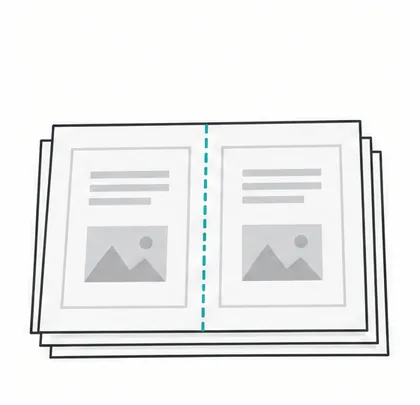 1. Stack the sheets in order
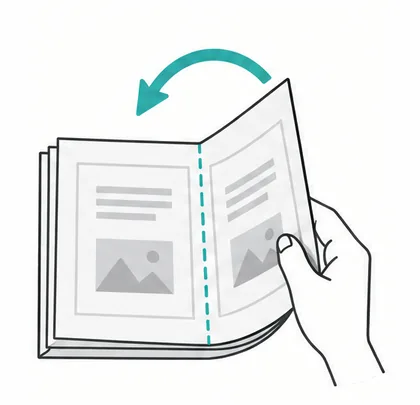 2. Fold the stack in half
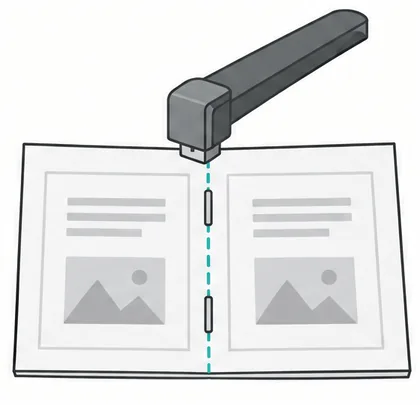 3. Open it and staple on the fold
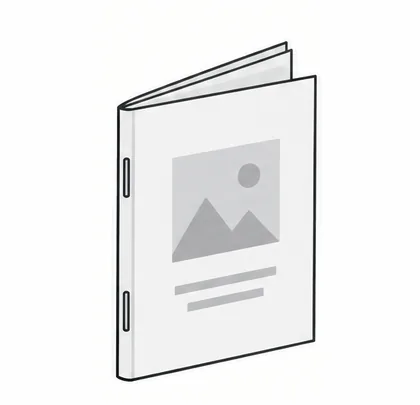 4. Fold it closed
Typical mistakes
- “Fit to page” is on. The page is scaled down a little, and the content no longer lines up with the fold.
- Flip on the wrong edge. Every back page is upside down. Switch between short and long edge.
- Pages shuffled after printing. Keep the sheets in the order they came out of the printer. Don’t sort them by page number.
- Printing from a document, not a booklet PDF. Print settings like “booklet” or “pages per sheet” differ between programs and are easy to get wrong. A finished booklet PDF prints the same way everywhere.
- Printer margins. Most printers can’t print right to the edge. Keep text a little away from the paper’s edge.
Not sure about your printer?
The booklet maker has a Printing guide with a one-sheet test. It tells you whether your printer prints on both sides and which edge it flips on, before you spend paper on the whole booklet.
Questions
Why do my pages come out in the wrong order?
Usually the PDF was printed straight from a viewer, not as a booklet. A booklet needs its pages reordered first: page 1 sits next to the last page on the same side of the sheet. The booklet maker does the reordering, and you print the result as it is.
Why is the back of every sheet upside down?
Your printer flips on the other edge. Print again with “flip on long edge” instead of “short edge”, or tell the booklet maker’s printing guide what happened and it turns the backs for you.
My printer can’t print on both sides. Can I still make a booklet?
Yes. The booklet maker has a manual two-sided mode: it gives you one file with the fronts and one with the backs, and shows how to put the printed sheets back in the tray.
How many pages can a booklet have?
Any number. Pages are added at the end to fill the last sheet, because every sheet holds four pages. Thick booklets are hard to fold and staple, so for a very long document it is better to make two or more smaller booklets.
Which paper size should I use?
Use the paper that is in your printer: Letter in the United States and Canada, A4 almost everywhere else. A Letter sheet makes a half-Letter booklet (5.5 × 8.5 in), and an A4 sheet makes an A5 booklet.
More guides
- Print a booklet on a Mac: Preview has no booklet option. Here is the quick way around it.
- Print a booklet in Word: Use Word’s book fold, or make the booklet from a PDF.
- Make a booklet from Google Docs: Google Docs cannot do it alone. Export a PDF and let the booklet maker order the pages.
- Zine maker: fold a mini zine from one sheet of paper.